




Shopify
Shopify BFCM Checklist 2026: What Merchants Overlook Until It Costs Them
Nikki Kumari|Sep 23, 2026|Read 6 Min



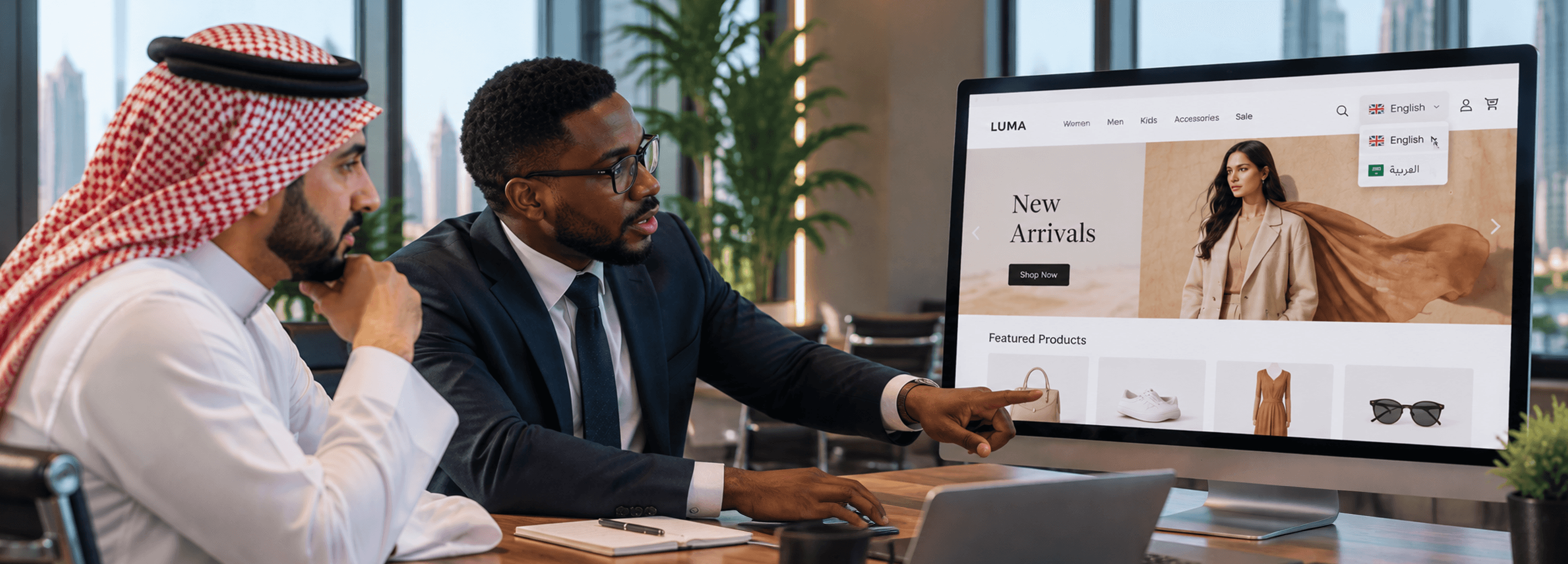
In the GCC, shoppers expect online stores to feel familiar. They might understand English, but they trust the ones that cater to them in Arabic too. For brands entering this region, building a multilingual Shopify store isn’t optional, it’s part of how a store earns real engagement and sales.
To build a multilingual Shopify store successfully for the GCC, you need more than translated text. Arabic changes how a store feels, its layout, direction, navigation and overall experience. There’s a real difference between a shop that is “translated” and a true Shopify multi language store that genuinely speaks to Arabic customers.
If you’re targeting the GCC Shopify market, here’s a practical breakdown of how to make your store bilingual (Arabic + English), from setup to launch.
Start by turning on Shopify multiple languages in your admin:
Go to Settings → Languages in your Shopify admin.
Choose Arabic in addition to English as a language for your store.
This adds Arabic as a published option that customers can access. Once added, Shopify will create language specific URLs like /ar/ for Arabic and /en/ for English. These help search engines understand that you're serving different language versions.
Enabling this feature is the foundation of any Shopify multilingual setup.
With languages enabled, the next step in creating a proper Shopify multi language store is translating content. This includes:
You can do this in two ways:
Shopify’s built-in tools let you translate these elements directly in the admin panel. It’s a quick first layer that helps make your store Shopify multilingual.
Third party apps like Weglot or MultiLipi can handle translations more comprehensively, sometimes including checkout and SEO related fields. They often provide automatic translation plus manual editing options.
Automatic translation speeds up the process, but especially for Arabic content aimed at GCC users, manual review and edits are crucial to ensure clarity and natural tone. Many brands rely on Shopify experts or a trusted Shopify development company to refine Arabic content properly.
A language selector needs to be visible and intuitive. Most Shopify themes will automatically show a selector after enabling Shopify multiple languages. If not:
It’s tempting to hide this in obscure places, but every additional click between discovery and purchase reduces the chance your customer completes an order.
If you want to truly build a multilingual Shopify store that performs in search engines, translation must include SEO elements:
This helps Arabic search queries rank properly in the GCC Shopify market, improving visibility and driving natural traffic.
Arabic is written right to left, and that changes how web pages feel.
A properly structured Shopify multilingual store needs:
Many themes don’t support RTL out of the box, so you may need a suitable theme or minor customizations. This is where experienced Shopify experts or a Shopify development company, like Codilar, can help ensure your store feels natural rather than translated.
Without RTL support, even a translated store won’t truly function as a high-quality Shopify multi language store.
One common pain point for multilingual stores is the checkout flow. It often remains in the default language unless fully supported.
While Shopify now allows translation of many checkout elements, some dynamic content may require translation apps or custom tweaks. Test this carefully. A checkout that is partly in English and partly in Arabic breaks trust at the moment of purchase.
For brands serious about the GCC Shopify market, checkout localization is non-negotiable.
Before you go live, simulate a real shopper in each language:
Don’t just read translated text. Observe how the pages behave and feel in each language.
Look for broken elements, untranslated labels, mixed layouts, or text that doesn’t fit. Testing often reveals things that translation alone won’t catch, like misalignment, overflow text, or functional elements that revert to English.
This step ensures you truly build a multilingual Shopify store that feels complete.
Once live, data becomes your guide. Keep an eye on:
This tells you whether your Shopify multilingual experience is working as intended or if adjustments in copy, layout, or SEO are needed.
Using both Arabic and English isn’t just a convenience. It's a business requirement for the GCC Shopify market.
Many shoppers navigate at least partially in Arabic, especially when it comes to trust signals like returns, policies, messaging, and the checkout process.
A well-executed Shopify multi language store builds confidence, leads to longer sessions, higher engagement, and better conversions. When you build a multilingual Shopify store the right way, customers don’t just visit, they complete the purchase and return again.
Shopify supports the Arabic language, but full Right-to-Left (RTL) layout depends on the theme. To properly build a multilingual Shopify store, you may need an RTL-compatible theme or help from experienced Shopify experts like Codilar.
Yes, Shopify supports Arabic through Shopify multiple languages. You can enable it in settings and translate your content to create a complete Shopify multilingual experience for GCC and global customers.
Enable Shopify multiple languages in settings, translate products and pages, add a language switcher, and localize SEO. This helps you build a multilingual Shopify store for GCC or international markets.
The best theme includes built-in RTL support, proper Arabic font rendering, and flexible customization. Many brands work with a Shopify development company to build a high-performing Shopify multi language store.
Create a Shopify account, configure SAR currency, enable Arabic using Shopify multilingual features, and localize checkout. Optimizing for the KSA Shopify market improves trust, engagement, and conversions.

Get tailored technology solutions to scale your retail business online
Request A Quote
Stay ahead with insights, trends, and brand success stories from the world of Digital Commerce.


Level 1, Building 7, Zone A Airport road, Business Gate P.O Box 93597 Riyadh 11683, KSA

DTECH, Techno Hub 1, Dubai Silicon Oasis Authority, United Arab Emirates - Dubai - United Arab Emirates


Codilar Digital Pte Ltd, 68 Circular Road, #02-01, 049422, Singapore

7th Floor, Jupiter Block Prestige Tech Park, Kadubeesanahalli, Bellandur Amtankere, Bengaluru, Karnataka 560103

Satrio Tower, Floor 6, Unit C and D, Desa/Kelurahan Kuningan Timur, Kec Setiabudi, Kota Adm Jakarta Selatan, Provinsi DKI Jakarta
We look forward to hearing from you